
Submission Validation
In this stage, you need to go through all papers to ensure only qualified submissions continue to the review process and that all papers are placed in the correct tracks. This can be done by General/Program Chair, Track Chair (for their track only) or Publications Chair.
To begin, click on the button Validate (in red). The following actions need to be performed before moving to the next stage:
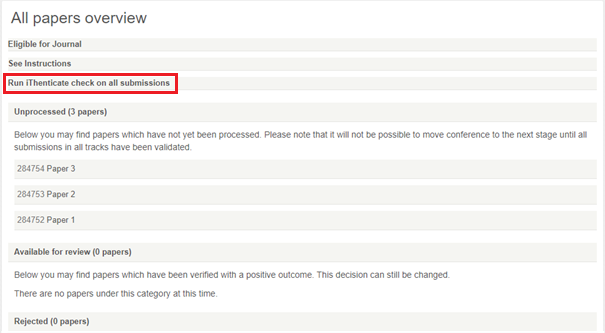
You can run the check on all submissions simultaneously, clicking Check All (in red), or you can do this for each paper individually (after clicking on each submission you will see the button to check plagiarism). The results are color-coordinated to indicate the level of plagiarism (over 30% is considered high and is marked red).
To validate a paper means to check if it is suitable to continue to the review process. This includes technical parameters, such as length, plagiarism (guide above), compliance with the double-blind review model etc., but also quality to establish a threshold.
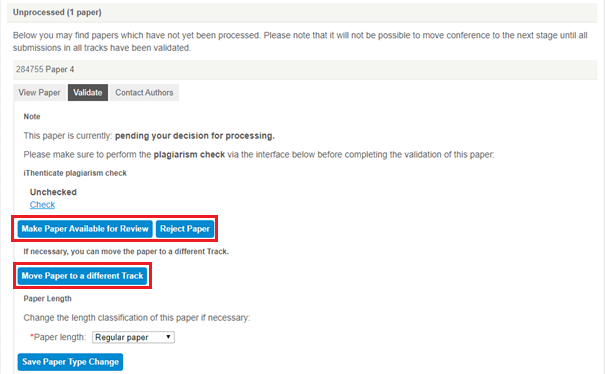
If the paper is suitable, you can click Make Available for Review and it continues to the next stage.
A paper might not be suitable for several reasons, see the common ones with tips on how to proceed below:
- Format is incorrect (e.g. authors not anonymous, wrong template) – for these papers, the best solution is to create a Corrections track by clicking on Create Tracks on the conference homepage (link to tracks guide). You need to inform authors about the necessary corrections, so they can re-submit the paper into the Corrections track in the right format. Make sure to announce a deadline for corrections to avoid delays.
- TIP: After you have notified the authors, it is recommended to reject the original submission to avoid confusion with having multiple version of the same paper in the review process.
- Quality might not be adequate (e.g. paper is too short/long, a work-in-progress/study, outside of track scope) – for these papers, it might be suitable to Move Paper to a different Track (such as one that suits the scope or length better), like a Workshop, Poster, or Works-in-Progress track. In case you do not have alternative tracks, you can create them by clicking on Create Tracks on the conference homepage (link to tracks guide)
- If none of the above apply, you can Reject the paper here and it will not be considered for review.
- Note: Papers rejected during validation will count towards the rejected papers when you calculate your acceptance rate. In All Papers Overview, they will appear strikethrough.
Next Stage: When the number of Unprocessed papers is 0, you have completed this stage and you can return to the conference Homepage and move to Paper Assignment.
In the following stage (Paper Assignment), all invited TPC members will receive a notification that they can request papers for handling. Make sure you have invited the TPC committee in the Invite PC section –> Overview or do so now, before moving to the next stage (link to Invite PC).
Check the upcoming deadlines to make sure that they are set correctly. The TPC members will see these deadlines in the notifying email and it aids them to handle the review of their assigned papers efficiently. Having the reviews done on time is essential in order to notify authors at the Notification deadline.


