
Initial Setup
Before the conference can be open for submissions, these aspects need to be configured in the setup:
Note: For EAI conferences, the Initial Setup stage is usually completed by the Conference Manager to allow the maximal possible time for accepting submissions. Being aware of the settings can still prove helpful during the review process.
In order to begin receiving submissions, at least one Standard Track needs to be created. Tracks are used to gather submissions and are distinguished into two categories: Standard tracks and Custom tracks. Tracks are created and managed in the ‘Create Tracks’ tab in the Global settings
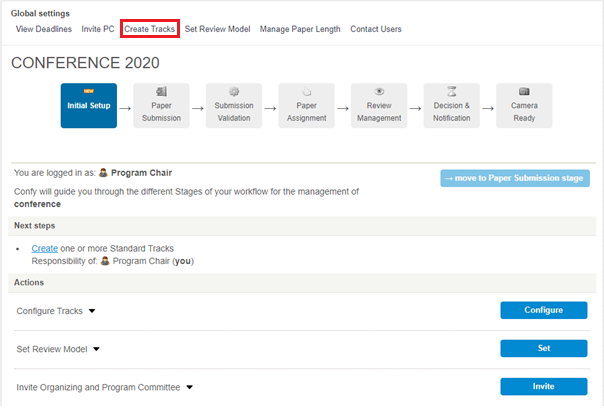
Standard tracks move with the conference. There can be one (e.g. Main track), or multiple Standard tracks (e.g. by topics). Standard tracks inherit the conference deadlines and they all move through the stages simultaneously with the conference. Standard tracks must be created before submission opens.
Custom tracks have more flexibility and autonomy. Their deadlines can be changed individually and each can move through the review stages at their own pace (quicker or slower than Standard tracks). This allows you to open a Late track while the Standard tracks begin review, or to keep a Workshop open longer. Custom tracks can be created while submission is open or during the review process. This means that you can open submission even if you are still waiting to confirm Workshops, Special Sessions etc.
Review Model and Paper Length need to be set prior to the Paper Submission stage to ensure authors are instructed correctly during their submission. Both can be found in their respective tabs in the Global settings.
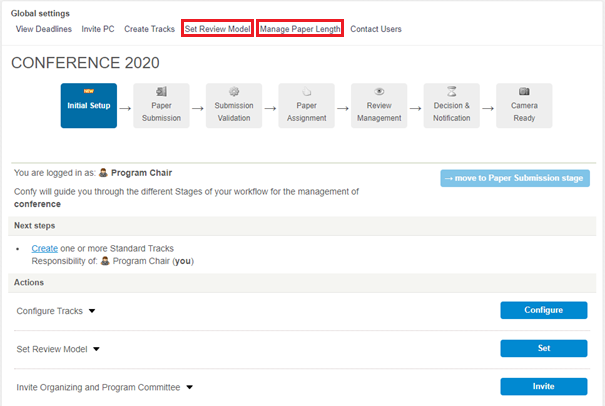
Set Review Model – the default mode is Double blind. If you wish, you can change this to change to Single blind. the Double blind model is recommended, as anonymity of submissions decreases potential review bias.
Manage Paper Length – the default is Regular Paper (10-20 pages). If you wish to create additional paper types (e.g. Short paper), this is managed here. You can also change the length of abstracts; the default is 200-1500 characters.
Next Stage: Once you have created at least one track, you can move to the next stage – Paper Submission. The conference (track) will stay in this stage until it is moved to the Validation stage after the submission deadline. Chairs should use this time to gather an international technical program committee. Read more about this stage below.


