
Populate the TPC committee
A distribution of roles between reliable members of the committee is a key element of a successful review. In order to prepare for the review process, invite Track Chairs and TPC members before the submission closes. Gathering a strong TPC committee is also an important element that aids the promotion of the conference, so it is beneficial to invite international and qualified members to join the TPC committee early.
To manage and invite TPC members and Track Chairs, click on Invite PC in Global settings:
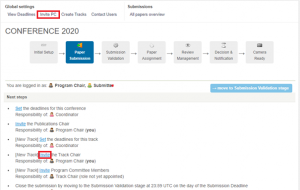
The following roles are needed:
- Track Chair – each track needs to have at least one Track Chair. If you wish to take on this role, you can invite yourself as Chair for one, or all tracks. Track Chair manages the review of their track(s).
- Program Committee Members (TPC members) – make sure you have enough people invited to form a quality international TPC committee. A TPC member is responsible for their assigned papers during the review process. This means that they invite Reviewers, oversee that a sufficient number of reviews is delivered, and submit recommendation to Chairs.
- IMPORTANT NOTE: TPC member and Reviewer are different roles. Chairs can only invite TPC members at this stage. Then, assigned TPC members invite individual Reviewers during the review process. This is to ensure compliance with the Double blind review model.
- TIP: When inviting, you may want to select the role called ‘All Tracks – Program Committee Member’. This means that if you later create additional tracks, these people will be available to handle papers in these tracks too.
- TIP: It might come in useful to also invite yourself (and other Chairs that might want to be active in the review process) as the ‘All Tracks – Program Committee Member’ so you can later also handle some of the submissions.
- Publications Chair – this person helps with submission validation and prepares the proceedings after Camera Ready deadline. Usually, the Publications Chair is appointed in the SAF document and the Conference Manager adds them when creating the conference in Confy+. You can invite additional people to the role.
The Invite PC page has two sections – Invite (form to add new members) and Overview (to monitor who is involved with the conference, their roles and tracks).


