
Making Submissions Available for Review
To validate a paper means to check if it is suitable to continue to the review process. This includes technical parameters, such as length, plagiarism (guide above), compliance with the double-blind review model etc., but also quality to establish a threshold.
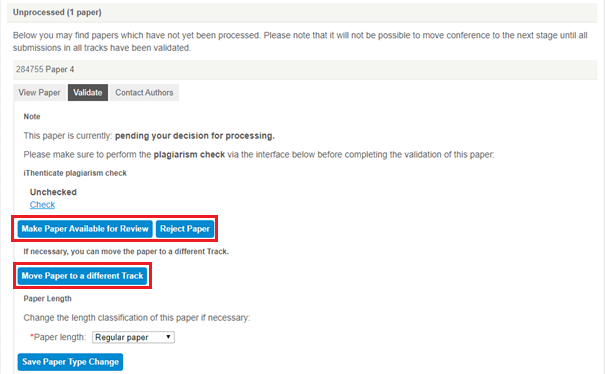
If the paper is suitable, you can click Make Available for Review and it continues to the next stage.
A paper might not be suitable for several reasons, see the common ones with tips on how to proceed below:
- Format is incorrect (e.g. authors not anonymous, wrong template) – for these papers, the best solution is to create a Corrections track by clicking on Create Tracks on the conference homepage (link to tracks guide). You need to inform authors about the necessary corrections, so they can re-submit the paper into the Corrections track in the right format. Make sure to announce a deadline for corrections to avoid delays.
- TIP: After you have notified the authors, it is recommended to reject the original submission to avoid confusion with having multiple version of the same paper in the review process.
- Quality might not be adequate (e.g. paper is too short/long, a work-in-progress/study, outside of track scope) – for these papers, it might be suitable to Move Paper to a different Track (such as one that suits the scope or length better), like a Workshop, Poster, or Works-in-Progress track. In case you do not have alternative tracks, you can create them by clicking on Create Tracks on the conference homepage (link to tracks guide)
- If none of the above apply, you can Reject the paper here and it will not be considered for review.
- Note: Papers rejected during validation will count towards the rejected papers when you calculate your acceptance rate. In All Papers Overview, they will appear strikethrough.


