
Paper Assignment
As Chair, in this stage your task is to assign one TPC member to each paper. The assigned TPC member is responsible for handling the paper review in the subsequent stages – they invite Reviewers and based on the delivered reviews, the TPC member will submit a recommendation that you can use to decide whether to accept or reject each paper. For full description of TPC member responsibilities, click here.
When you entered Paper Assignment, all TPC members received a notification instructing them to express their interest in the individual papers. You can use their indications of interest to distribute the assignments. To keep the process efficient, it is best to divide the work among multiple TPC members, so each one only has a few papers to handle.
NOTE: If you want to directly invite Reviewers, you need to assign yourself as TPC member to all submissions. In case you do not see yourself in the list of TPC members, this means you have not been assigned this role. In the global settings, click on Invite PC, to invite yourself to the role ‘All Tracks – Program Committee Member’. Full instructions for inviting TPC members and other roles are available here.
Then, you can return to the page for Assignments and assign yourself to any (or all) submissions. This means that you will be responsible for review delivery for the assigned papers.
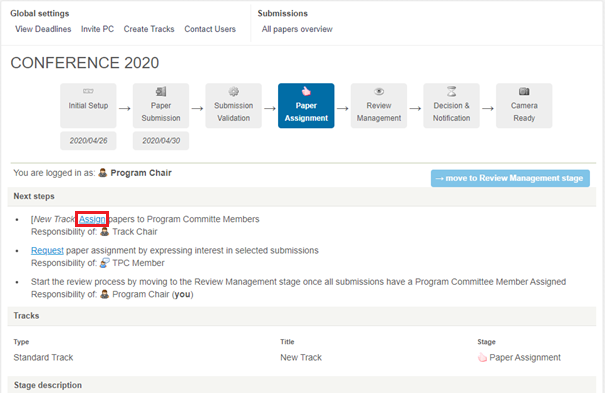
To view bids and assign TPC members, click on the ‘Assign’ icon in Next Steps (in red below). If your conference has several tracks, you have to do this for each track.
In the Assignment window, you see TPC members’ preferences and these can guide your assignment, see screenshot below.
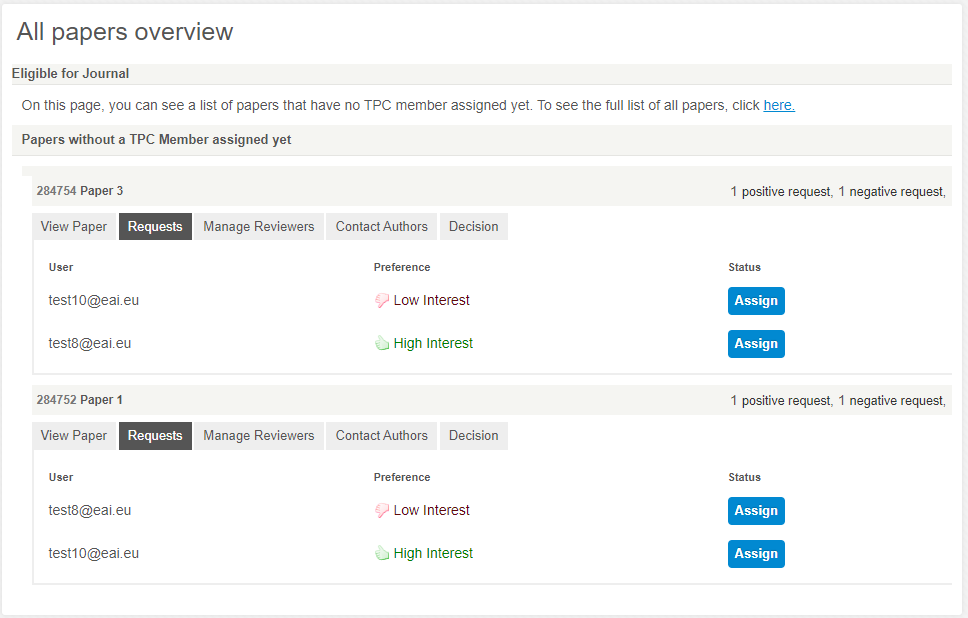
TIP: If you want to make changes to a paper where a TPC member is already assigned, go into All Papers Overview –> Requests. See instructions for accessing All Papers Overview here.
Next Stage: You can move to Review Management once all papers have an assigned TPC member.


