
Review Management
In Review Management, your role as Chair is more supervisory, compared to the previous stages. If all submissions have their TPC members assigned, you can monitor the progress of the review process. Click on ‘Make a Preliminary Decision’ (in red below) to see Review Information for all papers.
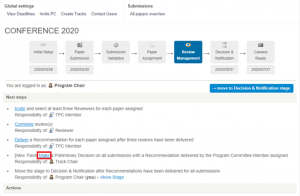
In this overview(screenshot below), papers are ordered from highest to lowest, based on their average scores. On the right hand-side, you can observe the number of completed reviews and invited Reviewers for each submission. Clicking on each paper opens its details and all activity that happened throughout the review.
TIP: You can also see the papers that have already received the TPC member Recommendation – they will be in green (accept) or red (reject). Once a Recommendation has been delivered, you can make the preliminary decision for those submissions already in this stage.
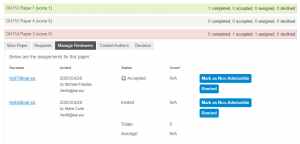
If you see that some papers are behind, you can do the following:
- Contact the TPC member to remind them of the approaching deadline
- Click on ‘Remind‘ to notify the invited Reviewers
- Invite additional Reviewers – the form is just below the invited Reviewers
- Deliver a Review – in order to do so, invite yourself as a Reviewer for the particular paper. You will then receive an email with the necessary information to deliver your review.
NOTE: If you as Chair have also assigned yourself as the TPC member or Reviewer, then you assume their responsibilities. Click below to view the role descriptions in Review Management:
The main objective of this stage is to ensure each paper has at least three reviews. As the TPC member, you are responsible for inviting these Reviewers, therefore your activity is crucial in order to move forward. You receive an email with the details (such as the deadline and next steps) when you have been assigned submissions. To handle the paper, log into Confy+ and click on My Assignments. Here, you can see all your pending assignments and you need to go through all of them to handle each one.
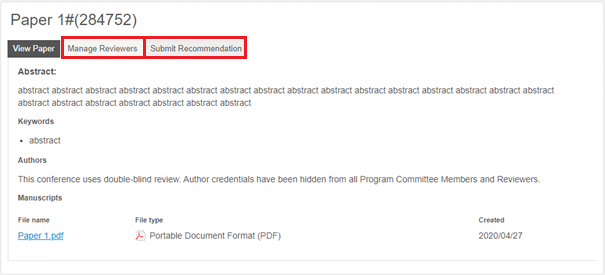
The following actions are needed in each of your assigned submissions:
- 3 reviews need to be delivered – this means you must invite Reviewers (it is recommended to invite at least 4-5 reviewers, as not all may deliver their reviews on time). There are two ways of inviting Reviewers in the Manage Reviewers section (highlighted in red on the above screenshot)
- Invite Reviewer – using the form where you fill in the Reviewer’s details (name, email, affiliation)
- Community Bids – Community Reviewers have already expressed interest in this particular paper, so they are motivated to deliver a quality review promptly. You can see Community Bids under the form.
- Submit recommendation – once the reviews have been delivered, you have to evaluate the Reviewers and submit a recommendation to the Chairs based on the reviews and your evaluation. This is an important indicator when making decisions, so it is advisable to try to complete the recommendation promptly.
Submitting the recommendation to Chairs is the final step of the TPC member responsibilities.
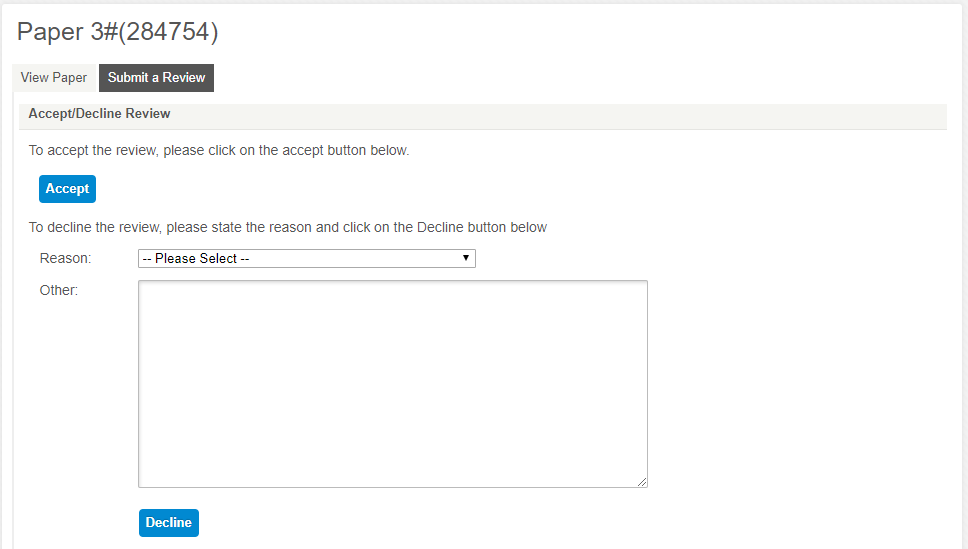
You have been invited to deliver a review via email. In order to complete this task, log into Confy+, click on My Assignments and here you can see a list titled My Pending Review Assignments. By clicking on each one, you can see the abstract and manuscript of the paper. In order to accept or decline the invitation, click ‘Submit a Review’ If you accept, clicking the button will take you to the review form. You can also decline this invitation.
Next Stage:You do not need to wait until all papers have 3 reviews delivered to move to the next stage, Reviewers can deliver reviews and new ones can still be invited once the conference is in Decision & Notification stage. You can begin deciding on the papers where you are certain to avoid a heavier workload at the end.


