
TPC Member in Review Management – Invite Reviewers and Manage Your Submission(s)
The main objective of this stage is to ensure each paper has at least three reviews. As the TPC member, you are responsible for inviting these Reviewers, therefore your activity is crucial in order to move forward. You receive an email with the details (such as the deadline and next steps) when you have been assigned submissions. To handle the paper, log into Confy+ and click on My Assignments. Here, you can see all your pending assignments and you need to go through all of them to handle each one.
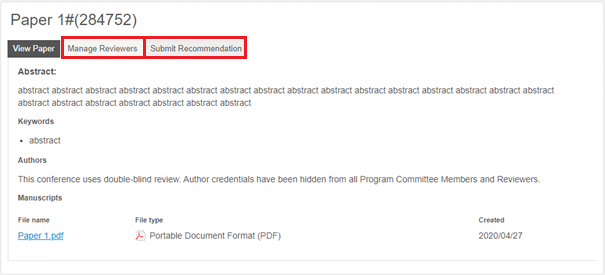
The following actions are needed in each of your assigned submissions:
- 3 reviews need to be delivered – this means you must invite Reviewers (it is recommended to invite at least 4-5 reviewers, as not all may deliver their reviews on time). There are two ways of inviting Reviewers in the Manage Reviewers section (highlighted in red on the above screenshot)
- Invite Reviewer – using the form where you fill in the Reviewer’s details (name, email, affiliation)
- Community Bids – Community Reviewers have already expressed interest in this particular paper, so they are motivated to deliver a quality review promptly. You can see Community Bids under the form.
- Submit recommendation – once the reviews have been delivered, you have to evaluate the Reviewers and submit a recommendation to the Chairs based on the reviews and your evaluation. This is an important indicator when making decisions, so it is advisable to try to complete the recommendation promptly.
Submitting the recommendation to Chairs is the final step of the TPC member responsibilities.


