Introduction to Confy+
Confy+ is a paper submission system designed to support technical committees during initial submission, the review process and preparation of the proceedings. This guide will take you through the entire life cycle of a conference, describing the various stages, the actions that need to be done and who is to complete each task.
This graphic shows the various roles, highlighting their primary goals in each stage of the conference process
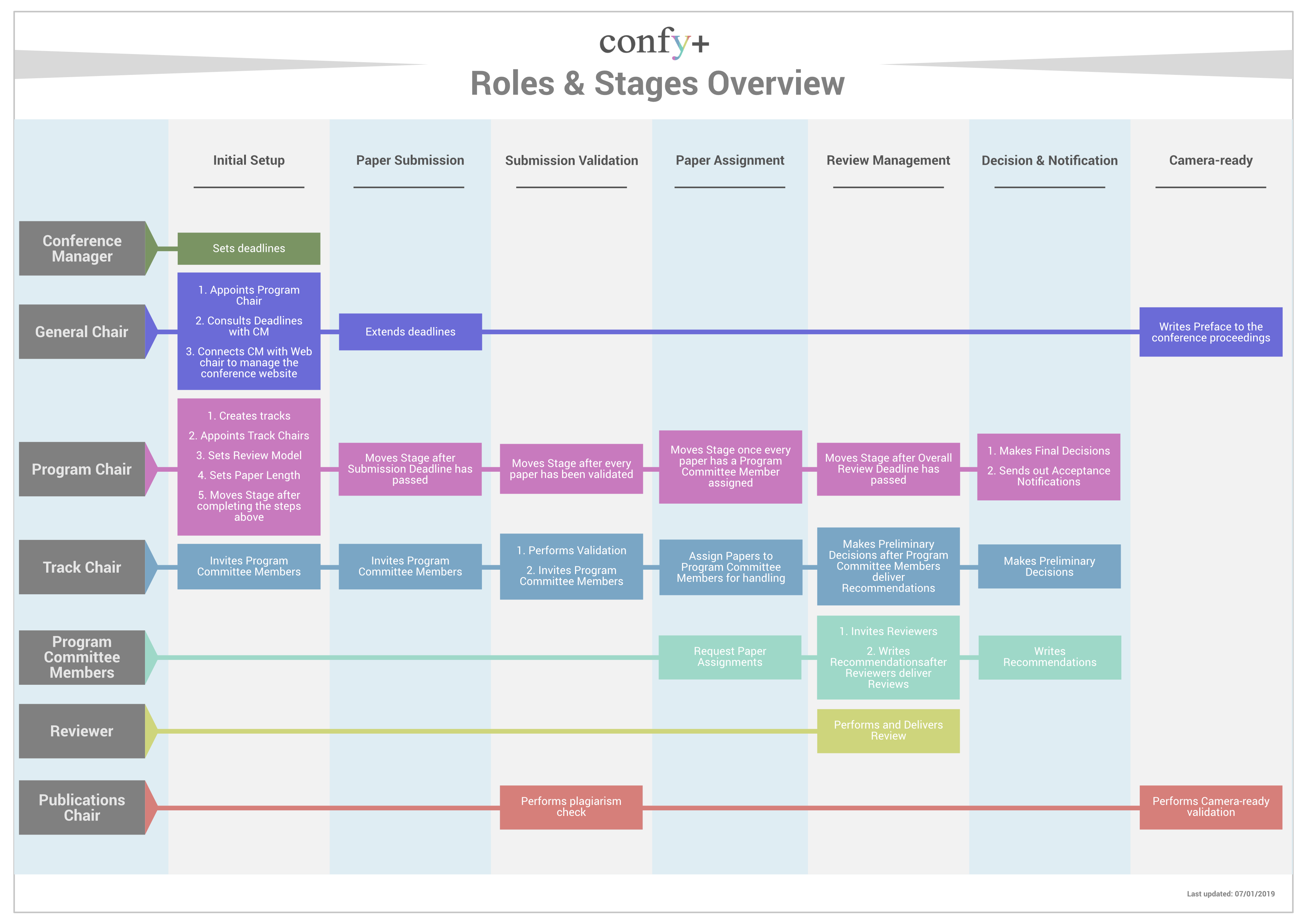
The details can be found below:
To divide the workload over time, the process is chronologically split into the following stages, with their main objectives listed:
- Initial Setup – prepare conference for submissions, set deadlines, define tracks and the review model
- Paper Submission – authors submit papers, Chairs prepare conference for review, open and configure workshops, or other custom tracks, invite TPC members, set review deadlines
- Submission Validation – beginning of the review process, Chairs run plagiarism check, select valid submissions for review, check and complete TPC committee
- Paper Assignment – Chairs assign TPC members to papers and check review deadlines
- Review Management – TPC members invite Reviewers, Chairs monitor TPC activity and review delivery, Reviewers deliver reviews
- Decision & Notification – final step of the review process, TPC members submit recommendations, Chairs make preliminary and final decisions on papers, send notifications
- Camera Ready – authors register and submit their Camera Ready submissions, Publications Chair validates papers and prepares proceedings
NOTE: The same stages apply to the overall conference and individual tracks. There are two types of tracks – Standard Tracks share the stage with the overall conference stage and Custom tracks can move separately. Read more about tracks here.
To divide the workload between members of the technical committee, Confy+ recognizes the following roles and their main responsibilities:
- General Chair/Program Chair – oversees the entire conference across all tracks and stages
- Sets the review model and paper length,
- create tracks,
- appoints Track Chair(s), or they can assign the role to themselves (by doing this, they assume Track Chair responsibilities listed below,
- invites TPC members,
- oversees the review process,
- delivers the final decision on submissions,
- sends notifications to authors.
General and Program Chairs are active in all stages of the conference. To view the detailed guide for Chairs, click here.
Note: General and Program Chairs can distribute the work to Track Chairs and TPC members, or they can be more hands-on and assign themselves to these roles, if they want to handle the responsibilities below:
- Track Chair – responsible for the review process of their track(s).
- Invites TPC members,
- validates submissions,
- assigns TPC members to papers,
- monitors review delivery,
- makes preliminary decisions on submissions.
Track Chair is active in all stages of the track. To view the detailed guide for Chairs, click here.
Note: Track Chairs can distribute the handling of the papers TPC members, or they can be more hands-on and assign themselves to these roles, if they want to assume the responsibilities below:
- TPC member – is invited by Chairs to bid on papers that they will handle (this means they will invite Reviewers, monitor review delivery, and submit a recommendation to the Chairs).
- Once assigned, a TPC member invites reviewers (3 reviews are needed per paper),
- monitors review delivery,
- deliver a review if needed,
- submits a recommendation to chairs.
TPC member is active during Paper Assignment and Review Management (possibly also during Decision & Notification, if they have not submitted recommendation prior to stage change).To view the detailed guide for TPC Members, click here.
- Reviewer – is invited to deliver a review.
- Delivers their review by the review deadline.
Reviewer is active during Review Management (possibly also during Decision & Notification, if they have not submitted review prior to stage change). To view the detailed guide for Reviewers, click here.
- Publications Chair – is appointed in the SAF document and invited by the Conference Manager, together with the General and Program Chairs.
- helps with submission validation,
- prepares the proceedings after Camera Ready deadline.
Is active in Submission Validation and in Camera Ready stage.
The conference homepage content changes across the stages, but the layout remains the same. View the most important parts to allow for easy navigation throughout the review process in the screenshot below
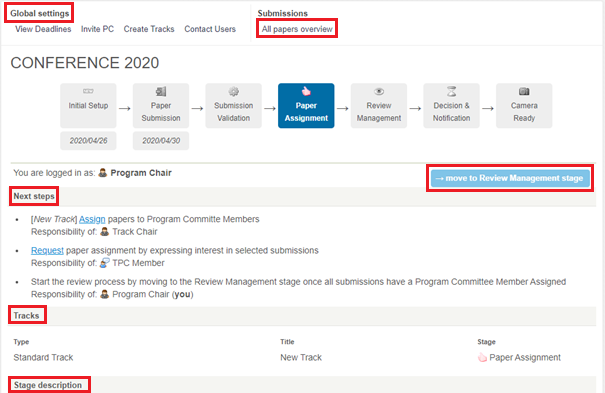
Global settings – On top of the conference homepage, you can find settings that are applicable in each stage – changing deadlines, inviting TPC members, creating new tracks and contacting users are available all throughout the review process.
All Papers Overview – a useful page for monitoring and managing submissions. Here you can see all activity related to each paper.
Next Steps – lists what actions need to be done (and who should do them) in order to move to the next stage.
–>move to {next stage} – becomes dark blue and active only after all mandatory steps have been completed.
Tracks – here you can see all tracks, their types and stages. By clicking on a track, you get to the track homepage. Standard tracks inherit the global settings from the conference, so they are managed from the conference homepage. Custom tracks have their own settings (e.g. deadlines, stages), so these are managed individually after clicking on the track. The details of navigation are in the screenshot below.
Stage description – at the bottom of the page you can find useful information about the objectives of each stage.
Page Flow
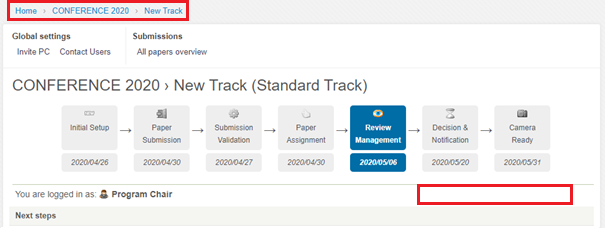
To navigate between pages, use the toolbar above Global settings (screenshot below shows the homepage of the conference).
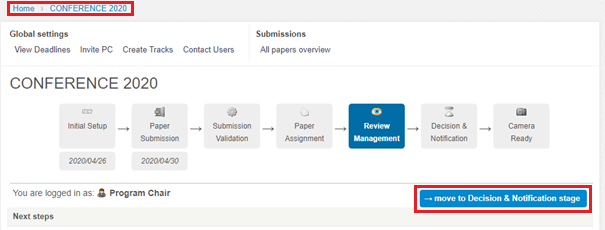
Here, you can see the difference between the Conference (above) and Standard track (below) pages. For Standard tracks, the page does not have the button ‘–>move to {next stage}’ and some global settings are missing. That is because moving forward and managing the settings needs to be done on the level of the entire conference. In the top toolbar, click on conference to return to conference homepage. Custom track pages look the same as the conference, because their setting can be adjusted individually.